
In this article we tried to explain how we Scrum in MFE.
Introduction
The MFE team has been trying to practicing Scrum for some years. We tried various practices and variations before we found the most balanced way to work. I emphasise, there is no universal approach that works for everyone. In this article, we will try to describe how we do Scrum in our team so you can decide if it might work for yours.
Let’s start with our goals and expectations for Scrum:
- Build a fast-moving, iterative process.
- Share daily status updates.
- Improve collective code ownership.
- Deliver updates continuously during short intervals.
- Switch to shorter release-cycles, ideally every two weeks.
- Improve our team collaboration and progress visualisation.
- Get feedback at early stages of development to be able to react immediately.
- Become flexible enough to modify features on the fly.
Here are the main steps we took during our Scrum transformation:
- Defined basic scrum roles.
- Created and prioritised our product backlog.
- Defined procedures for estimation and planning.
- Configured our scrum board.
- Scheduled the first sprint.
- Performed sprint planning.
- Started to do daily stand-ups and track our progress during the sprint.
- Performed sprint demo for the whole team at the end of the sprint.
- Deploy and release completed user stories.
- Performed retrospective.
- Continuously repeated steps 5-10, improving our process with every sprint.
After the major release we also perform a big release retrospective, where we discuss the current process and suggest improvements.
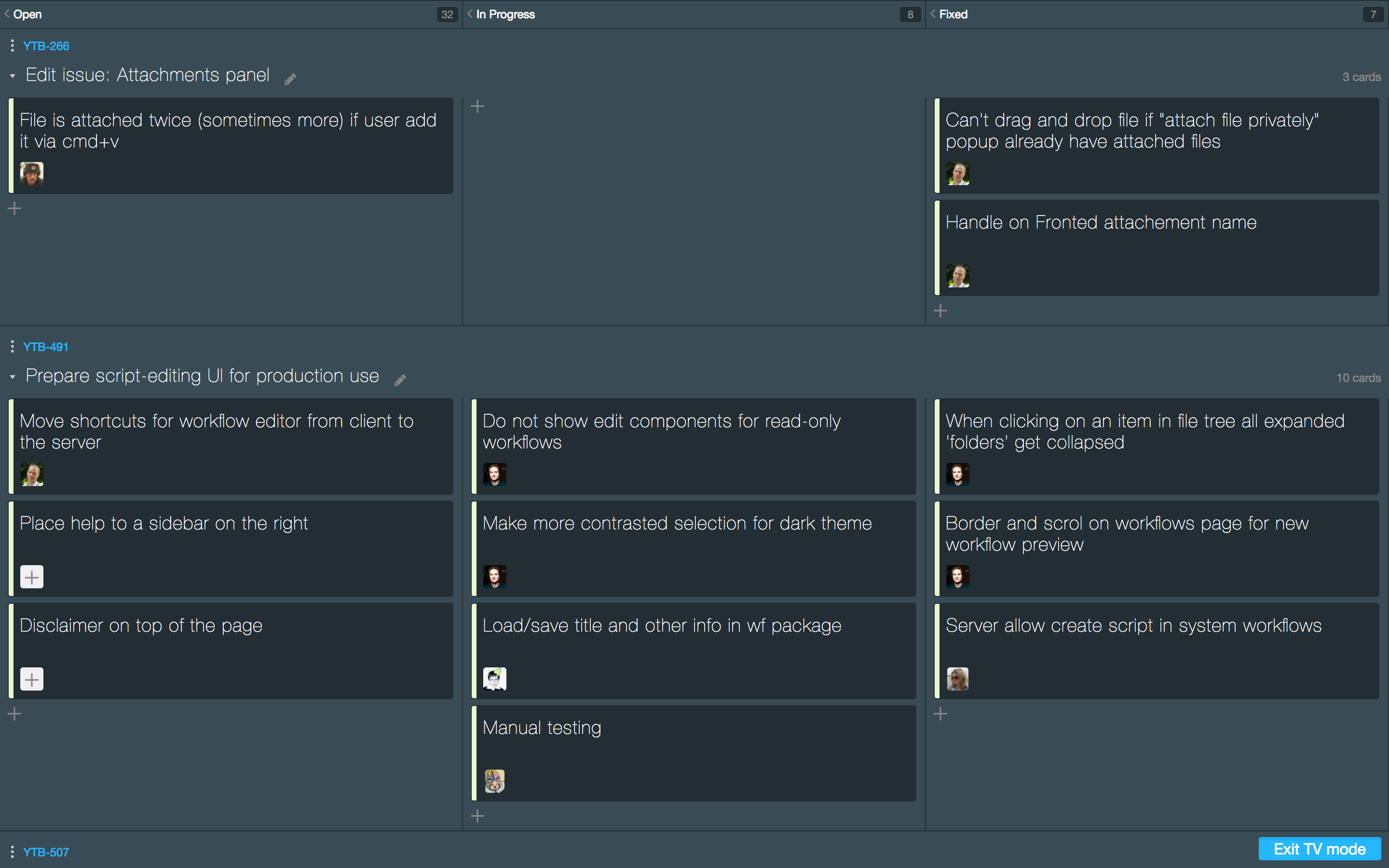
Just as an example, here is how our Scrum Board looks during a sprint:
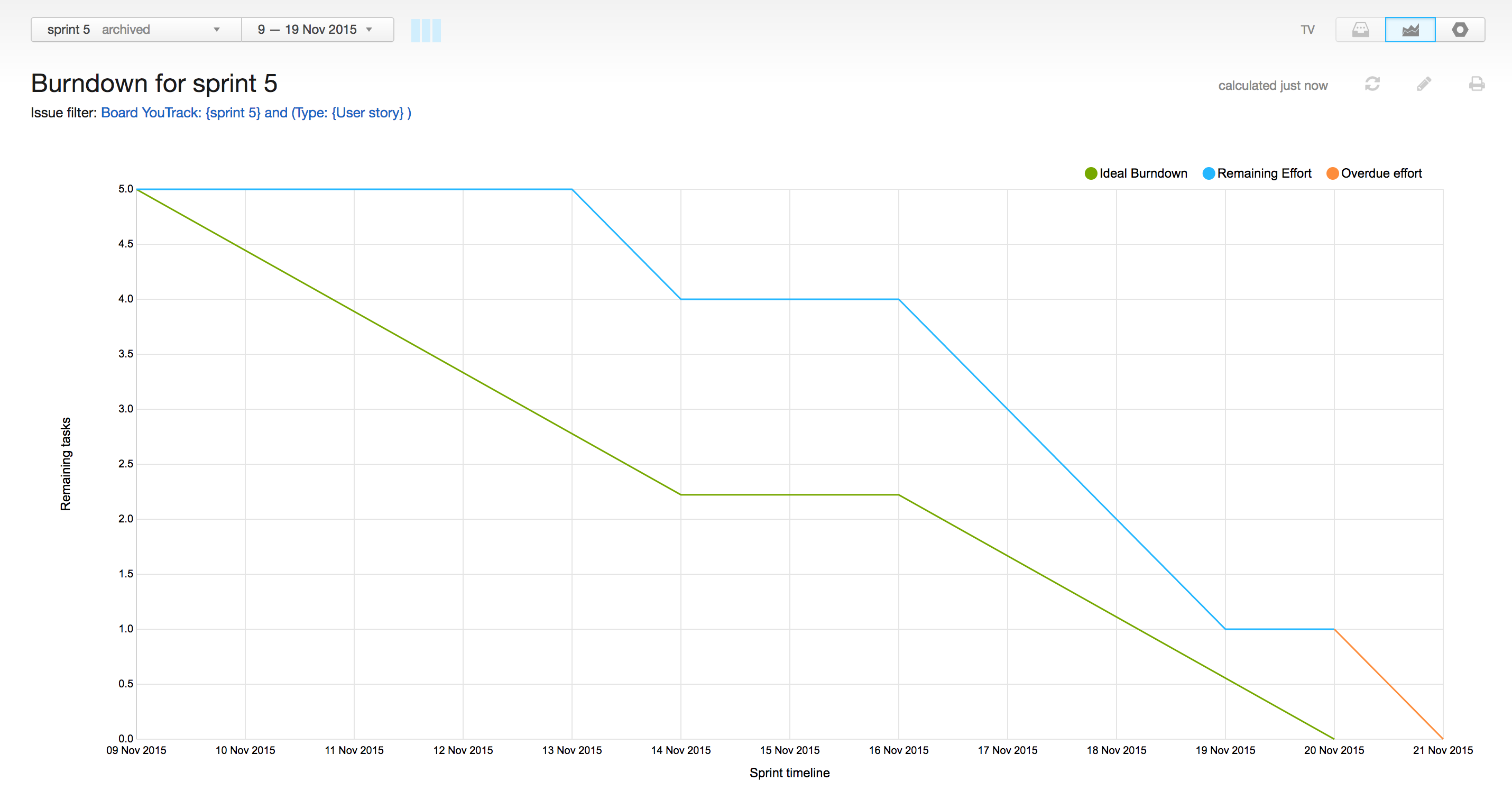
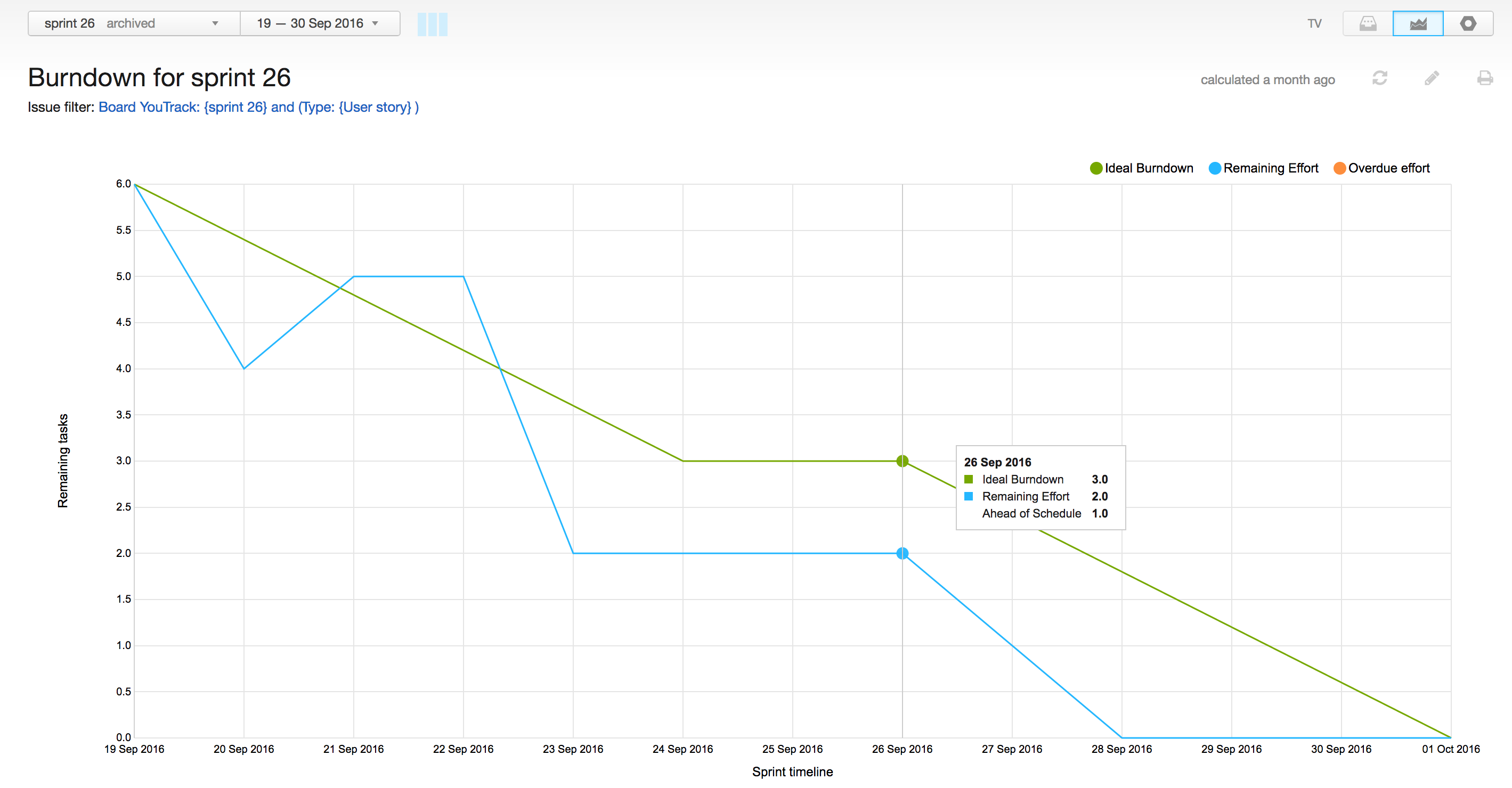
And here’s how our Scrum transformation increased the velocity of our team over the past year. These charts show the number of user stories we burned down in one of our early sprints compared to a sprint that was scheduled one year later:
In this next section, we cover every step of our Scrum transformation in detail. Each post is dedicated to a single step. I describe the various options we tried for each step and share our results and experiences. Most importantly, I describe how we tuned YouTrack during our Scrum transformation.
Our Scrum Roles
The first step in our Scrum transformation was to define who would take on each of the core roles.
Product Owner
In the MFE team, the Product Owner is responsible for prioritising issues in the product backlog and deciding what we do next. The Product Owner keeps a finger on the pulse to make sure our product goals and mission meet the needs of our customers, while the team finds the best technical solutions to achieve these goals. In the MFE team, the Product Owner role is taken by the Team Lead. However, members of the team have the right to raise the priority of a user story when they feel it’s important, providing strong reasons to support it, of course.
Scrum Master
This role is played by one of the developers from the MFE team. Our Scrum Master has a deep knowledge about the product architecture, technical solutions, and limitations. During the planning session, normally she/he presents each user story we plan to work on during the sprint. After the planning session, where we discuss each user story in details and decide which tasks we need to accomplish, she decomposes each user story into a set of tasks. The Scrum Master rules the process and keeps an eye on every sprint task. But what’s more important, our Scrum Master continuously monitors the progress and makes sure everyone follows the rules we agreed on. Generally, the Scrum Master makes our process work.
Scrum Team and Stakeholders
All of the members of the MFE product team take on the role of the Scrum Team. Each team member is accountable to the rest of the team for his or her performance. Our Scrum team is cross-functional, meaning that members of the team have all the skills necessary to do the work (analysis, design, code, test, documentation, marketing, technical support). Our Scrum Team is self-organising, self-managing, and constantly trying to improve. The team members commit to the amount of work they can do without undue influence from the Product Owner.
Even though many advocates of Scrum recommend working face-to-face, our Scrum Team is not collocated. We are a remote first company. To overcome this disadvantage, we rely heavily on video chat (skype) and make great use of real-time team collaboration tools like Mattermost.
A very important aspect in MFE, is that the product team also takes on the Stakeholder role. Every member of the team has direct access to customer feedback. We aim to create a great product that both satisfies the needs of our customers and meets our internal goals. So whenever we plan a new feature or improvement, we collect our ideas, carefully analyse external feedback, and finalize the requirements based on both inputs. In practice, this means that we use what we know from our customer base to define the acceptance criteria for every feature, and collectively decide whether the implemented functionality meets this criteria during the sprint demo. During planning, we discuss and agree on the best way to deliver this new functionality from the business logic side and technical side.
In the next section we will discuss how we organize our product backlog.
Our Product Backlog
In our case, the product backlog is a set of features that we plan to build. At MFE in general, we conduct a comprehensive planning session at least once a year. We gather the whole team for several days outside the office and discuss our plans from different perspectives: what do our customers want, what’s important from our point of view, and what do we consider to be cool to work on. We verify these points against the product mission and company goals.
As a result, we create a list of the main directions we are planning to work on and define a set of must-have, should-have, and could-have features for each subsystem. Must-have features go first in the list, should-have and could-have get lower priority. We also take into account the minimal set of functionality we need to develop to share it with our customers as an early preview. The main goal is to get feedback as soon as possible and tune new features on the fly.
We take this list and create a set of user stories in YouTrack to track. We only create issues for all the development tasks during planning sessions and sprints in the correspondent public project. he backlog is stored as a saved search that is used on the Scrum board. We call it "Project" Backlog User Stories. Here is the search query behind it:
#iGoX #Unresolved has:-{Board iGoX} Type: Bug, {User Story}
We order the issues manually to reflect their priority.
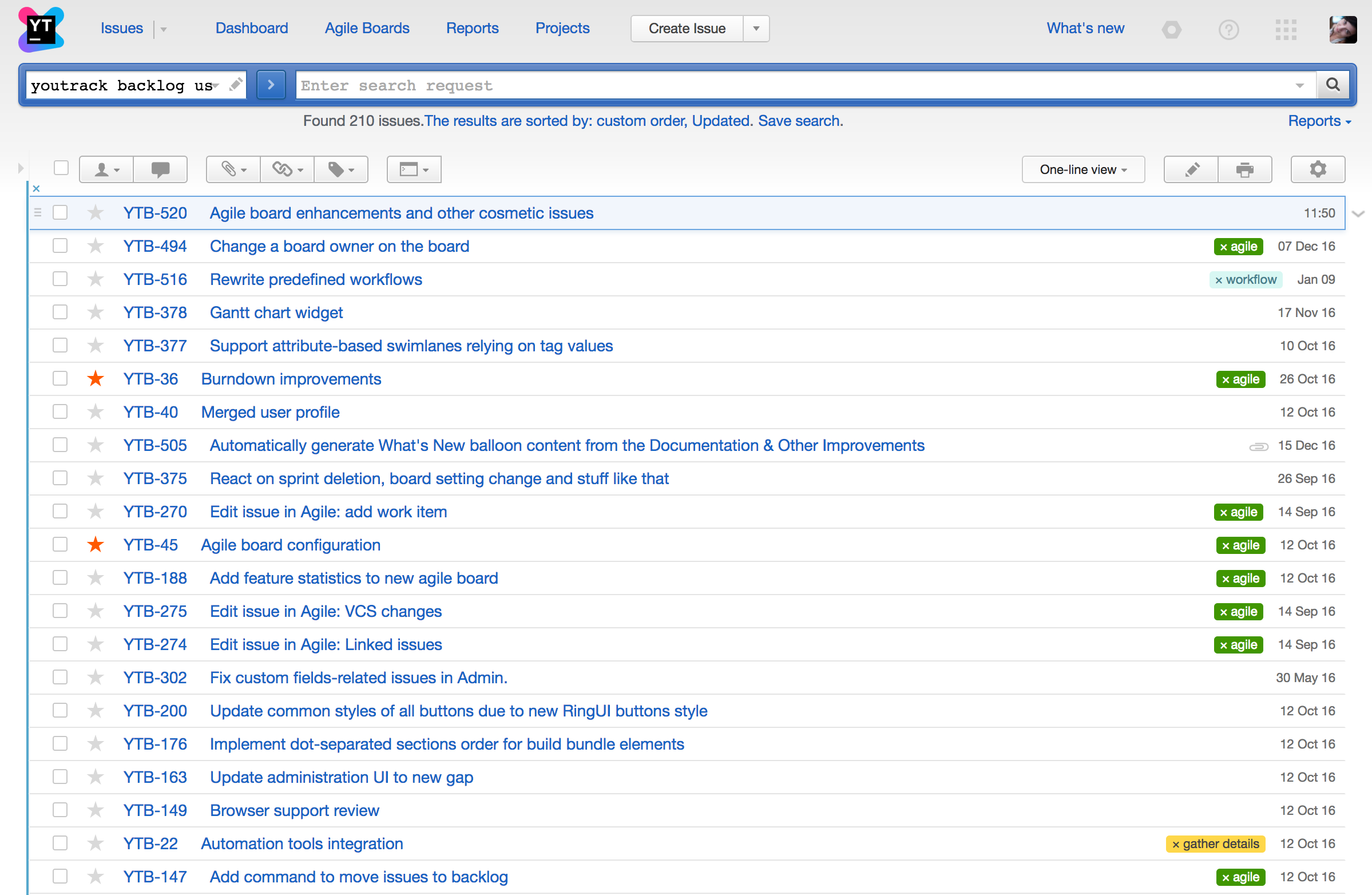
Here’s how we use YouTrack to manage the product backlog:
Use a filter to show unresolved user stories that are not already on the board and represent meaningful pieces of work: #iGoX #Unresolved has:-{Board iGoX} Type: Bug, {User Story}.
Save this search as "Project" Backlog User Stories.
Prioritise the backlog according to our plans for the next release. We sort our backlog manually by dragging the items in the list. Tips: YouTrack keeps your manual sort order on the saved search and highlights it with the blue vertical line at the left of the list.
Tune our backlog on on a regular basis, reordering user stories as they become more or less important.
In the next section we will discuss our approach to estimations.
Our Approach to Estimation
Recently we introduced the #NoEstimates approach to our Scrum process. Instead of using estimations and spent time to calculate the burndown, we track our progress based on the number of user stories we finish in each sprint. The main concept behind this approach is that our sprint goal is to deliver a set of user stories and it doesn’t matter how many tasks we need to complete to achieve this goal.
The benefit of this approach is that it reduces the amount of time spent estimating user stories and tasks during every planning session. However, it requires certain amount of experience and discipline from the team. We added a simple rule that helps us benefit from this approach: it cannot take longer than two days to complete any task. If the task requires more effort to finish, it should be split into smaller units of work. We agreed that it’s absolutely fine to add tasks during the sprint, as we save time on planning session and don’t discuss every small unit of work in advance. The Scrum Master is responsible for enforcing this rule. If a member of the team reports work on the same task for three consecutive stand-ups, the Scrum Master asks this team member to split the task right away.
Burndown
With the #NoEstimates approach, we track our progress over the number of completed user stories, so no estimation field is required. Here is how we configured the YouTrack Scrum board to calculate a burndown based on user stories:
- On the Card tab of the Board Settings panel, set the Estimation Field to No Estimation field.
- On the Chart tab, select Burndown, set the Issue Filter to Custom, and set the Query to: Type: {User Story}.
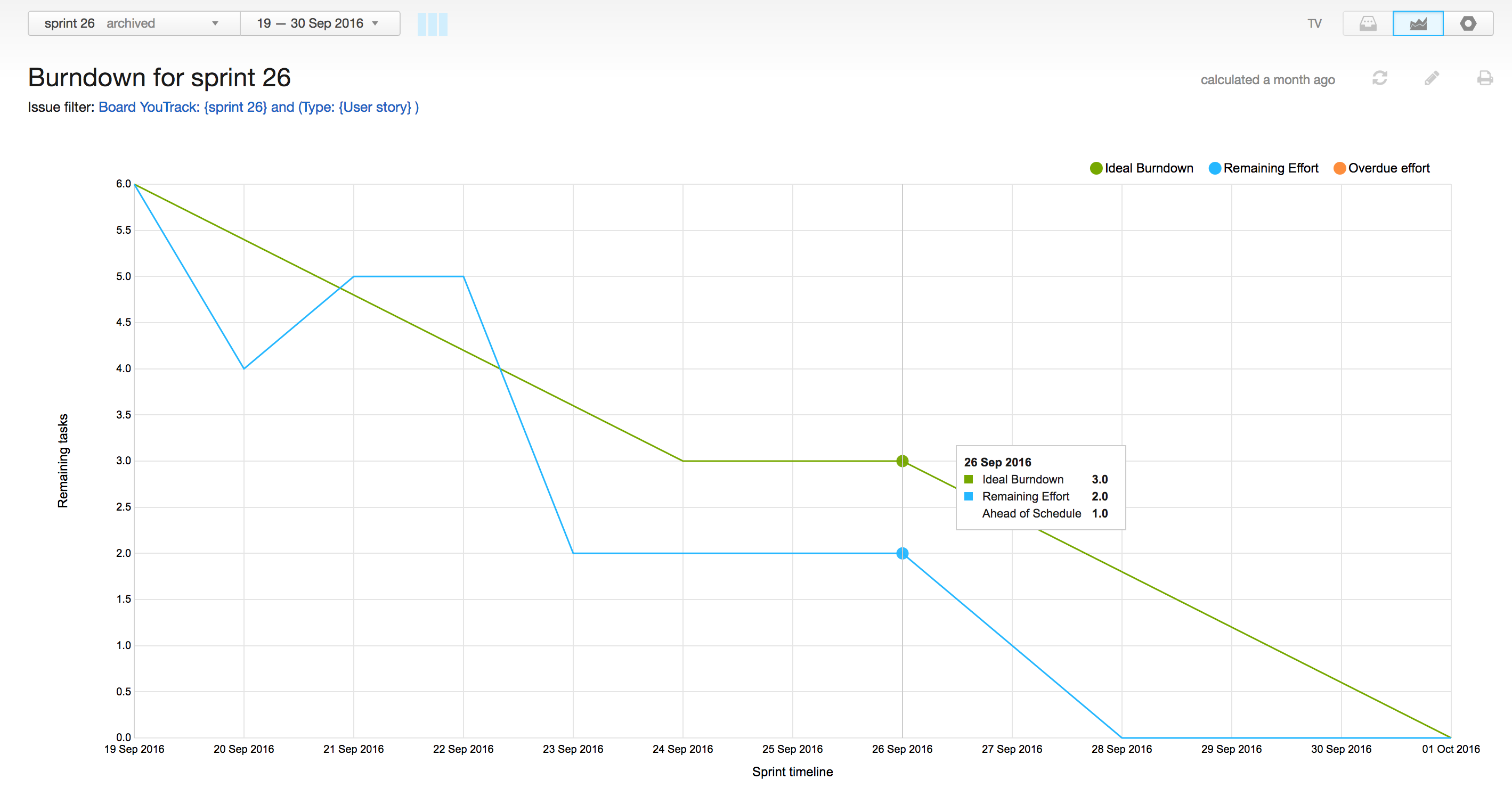
There is also an option to calculate the burndown based on the number of resolved tasks (All cards). However, because we continuously add new tasks to the sprint, the Ideal Burndown fluctuates and becomes unusable.
Here is an example of a pretty balanced sprint with just the right number of user stories and tasks.
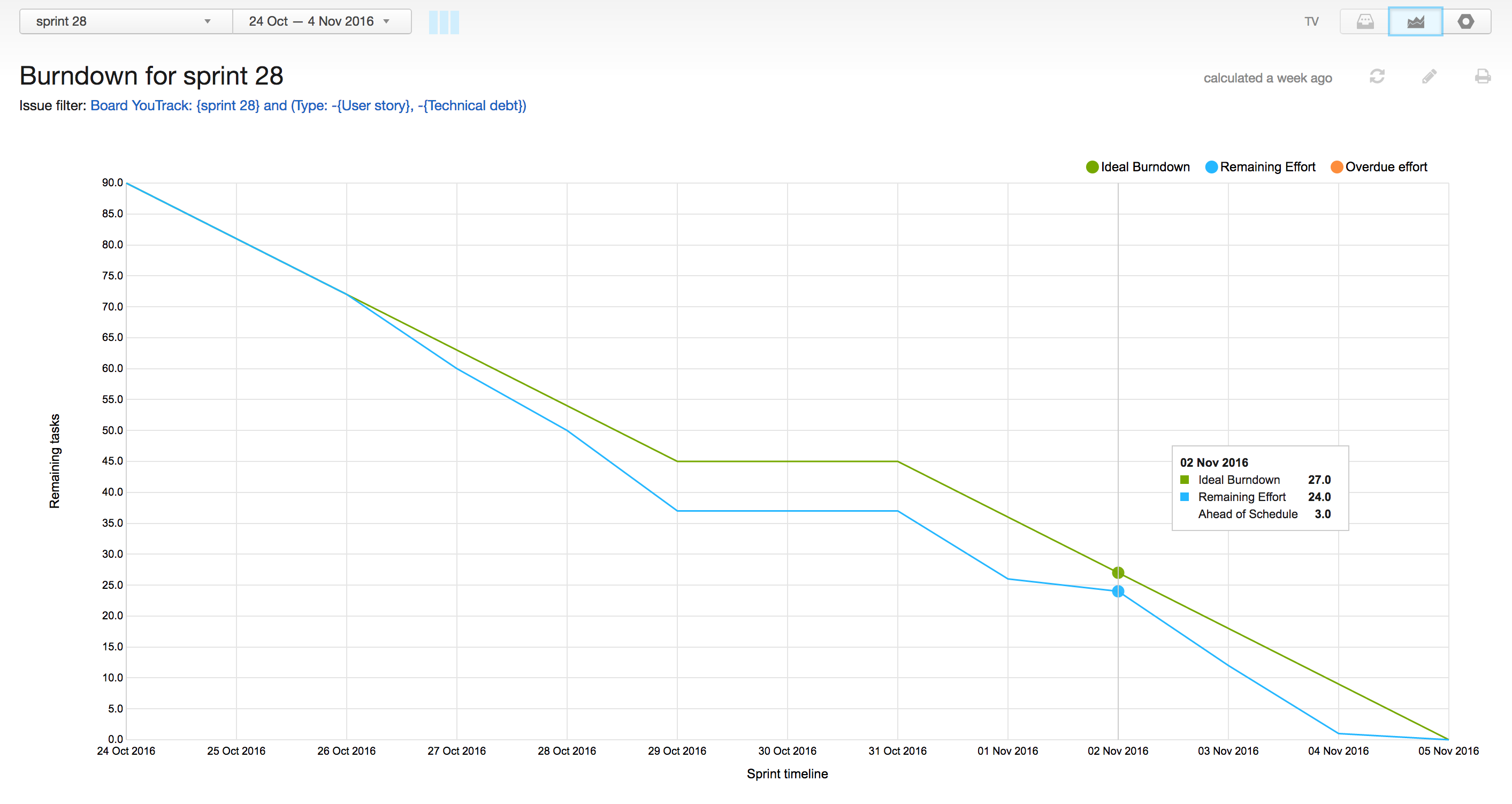
Previously, we used planning poker to estimate tasks. Now that we have more experience and know the velocity of our team, we have a good feel for the number of user stories we can finish in a sprint. If you are new to agile, we recommend that you to start with a basic strategy for estimating tasks. After several months, you can give the #NoEstimates approach a try, if you feel that you are ready to benefit from it.
In the next section we talk about sprint planning.
Our Sprint Planning
The Sprint Planning event is an important part of our Scrum activities. We have planning sessions at the beginning of every two-week sprint. We get the whole team together, including QA Engineers, UX Designers, Support Engineers, Technical Writers, and Marketing Managers to discuss the user stories that we want to take for the upcoming sprint.
The MFE team is not large and is distributed because we are a remote first company. We schedule this meting and use Skype to get together to the planning session. Before the planning session begins, the Scrum Master prints the user stories and pins them to a physical board. Every member of the team checks the description of each user story to actively participate in the planning discussion.
Our planning session is divided into two parts: general and technical. The general part is devoted to discussing the business scope. The Scrum Master describes each user story, so the team can discuss the scope in detail. Everyone is free to ask questions for clarification. Discussion is over when there are no further questions and everyone understands what needs to be done to implement the user story.
When the general part is over, developers start the technical part. Everyone else may leave and get back to their normal activities. The developers discuss technical details and split the user stories into tasks. Since we started using the #NoEstimations approach, we don’t estimate user stories and tasks during the planning session. We make sure to discuss the maximum amount of detail so as not to forget anything important. If we realize that the task takes more than two days to complete, we can further decompose the task during the sprint.
Our planning session normally takes from 60 to 90 minutes. The general and technical parts take about 30-45 minutes each. We strongly believe that these regular sessions help the whole team stay on the same page and keep focused on what’s important to everyone:
- The QA team knows how the feature is supposed to work when it comes to testing.
- The Support team is aware of everything in development and decides which support tickets should be added to the board.
- The Technical writers team get all important details about new features, so it’s easier to document them for the end users in future.
- The Marketing team brings customers’ requirements and use cases to every user story, and get all the details they need to introduce new features to our audience.
In the next article we will talk about the sprint.
The Sprint
Our Scrum Board
When the planning session is over, the Scrum Master drags the planned user stories from the backlog to the sprint board and creates the appropriate tasks for each story. The sprint starts when the board is ready. Everyone is free to take an open task from the uppermost swimlane if possible and start working on it.
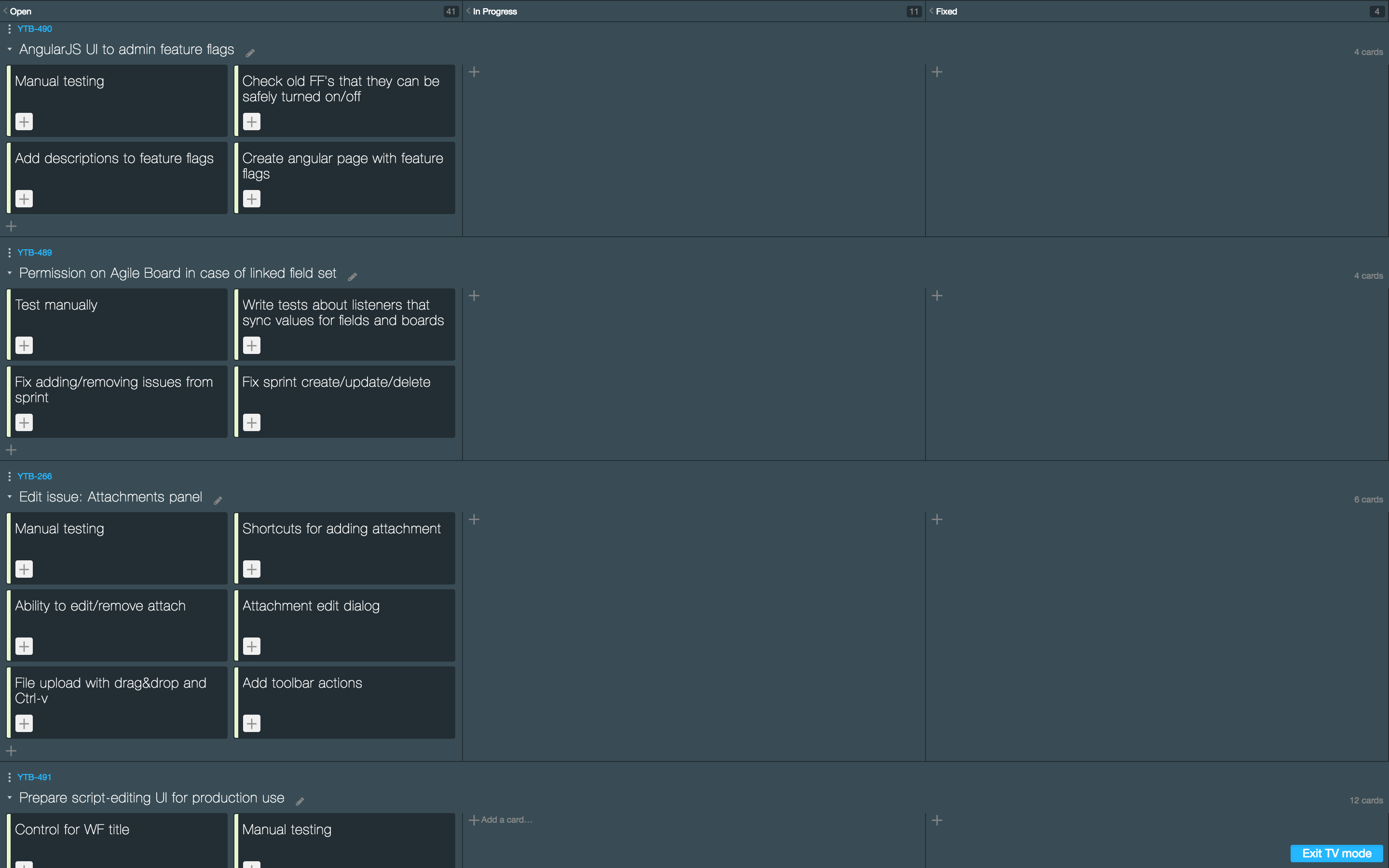
We try keep only one task in progress for each team member. However, sometimes a developer may take a support ticket for investigation and still work on a development task.
Tips
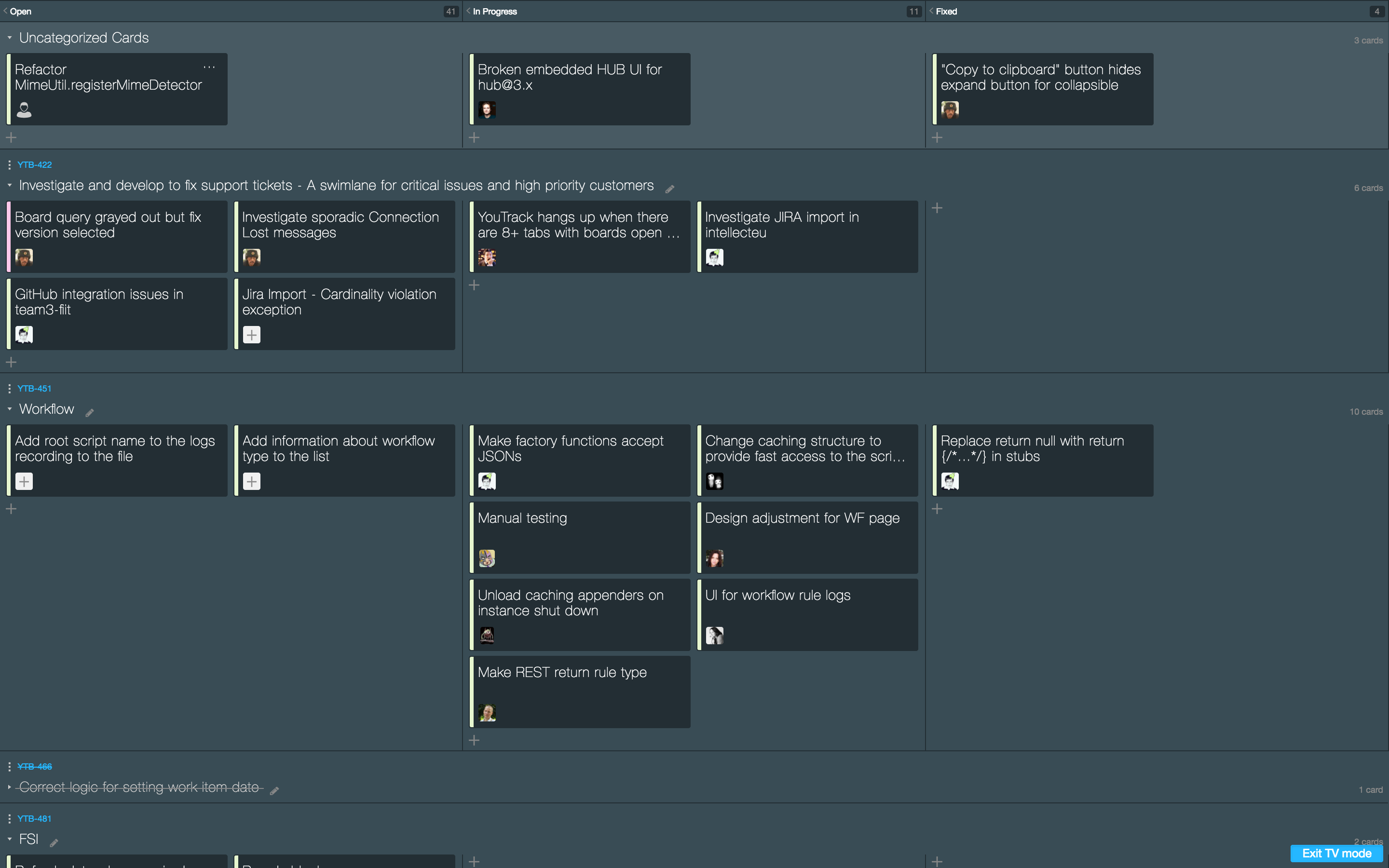
- We place uncategorized cards at the top of the board. In this swimlane, we add critical bugs and tasks we think are important to accomplish during the sprint. This swimlane helps us to keep an eye on important activities that are not related to any user stories.
- In the future we think that is important to have two swimlanes dedicated to support activities for every sprint. We believe it’ important to investigate and fix customer’s tickets ASAP and want to allocate time during the sprint for these activities. This way, we monitor our progress on support tickets that require attention from developers and clearly prioritise these tickets: critical problems are added to the uppermost swimlane, while normal and major support issues go to the support swimlane at the bottom of the board. If we don’t resolve these issues during the current sprint, we move them to the top swimlane in the next sprint.
Scrum Board Settings
.... TODO
Our Sprint Demo Session
.... TODO
Our Sprint Retrospective
.... TODO